
Reviewed 29 October 2026
Night Rider Controls, Wheelies & Tricks
Find Night Rider input hints, understand the wheelie balance display and equip tricks from the Tricks menu.
§Use the input hints for your device#
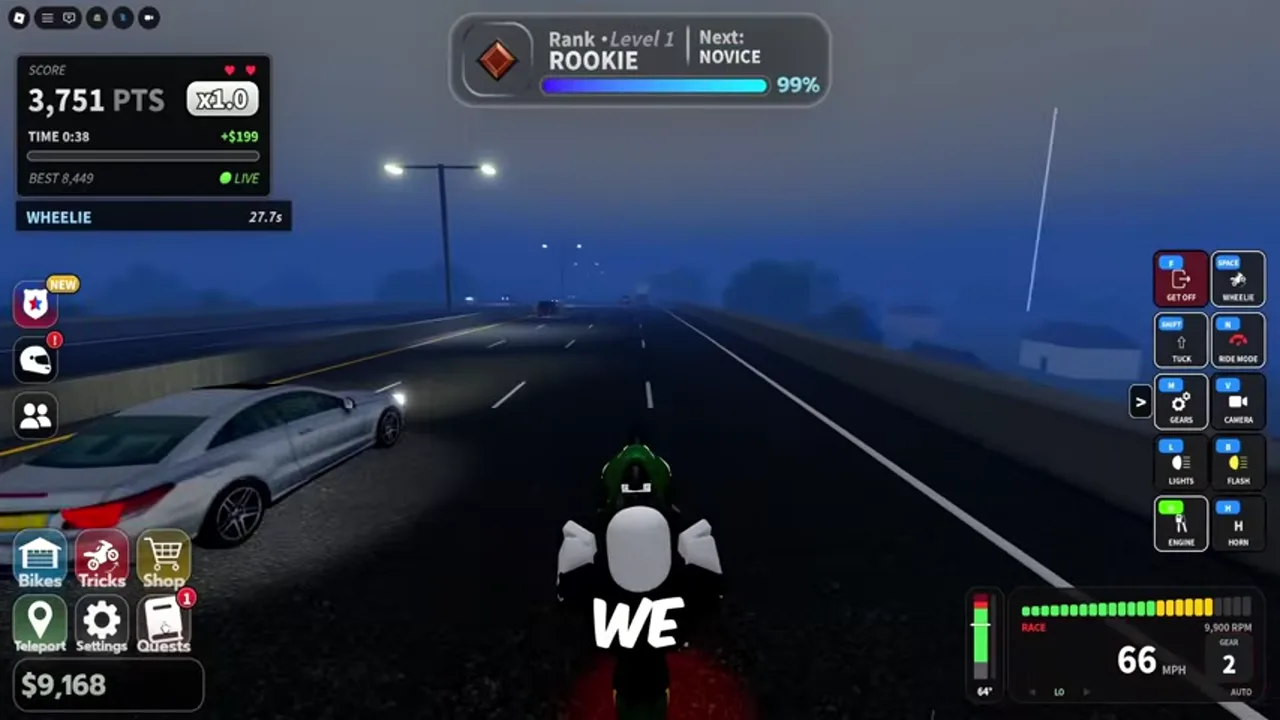
The official page supports PC, controller and mobile. Reviewed PC footage shows a list of controls on the right side of the riding screen. Use the current labels as the authority for your device. Community instructions report Space for a PC wheelie, but check your active binding before trying it.
Try camera, steering and braking controls while stationary or moving slowly. If a menu covers the road, close it before accelerating. On a phone, leave enough room for the touch controls and check that the full HUD is visible.
These bindings are visible in the reviewed PC footage. The neutral key appears in one HUD state and disappears in another, so use the current gear-mode prompts for shifting. We have not mapped controller buttons or touch controls.
| Recorded PC key | HUD action |
|---|---|
| F | Get off |
| Space | Wheelie |
| Shift | Tuck |
| N | Ride mode |
| M | Gears |
| V | Camera |
| L | Lights |
| B | Flash |
| E | Engine |
| H | Horn |
§Start with a short wheelie#
The footage shows a colored balance meter during a wheelie. Community guidance recommends keeping the marker in its green region. Begin on a clear stretch, use the displayed wheelie input and make small corrections. End the attempt before traffic or the balance meter becomes difficult to manage.
Practice holding a short wheelie consistently before adding close calls. A long run from a video does not establish a safe input sequence for every motorcycle or device. If your front wheel repeatedly falls or the rider tips back, reduce the duration and change one input at a time.
§Buy or equip a trick#
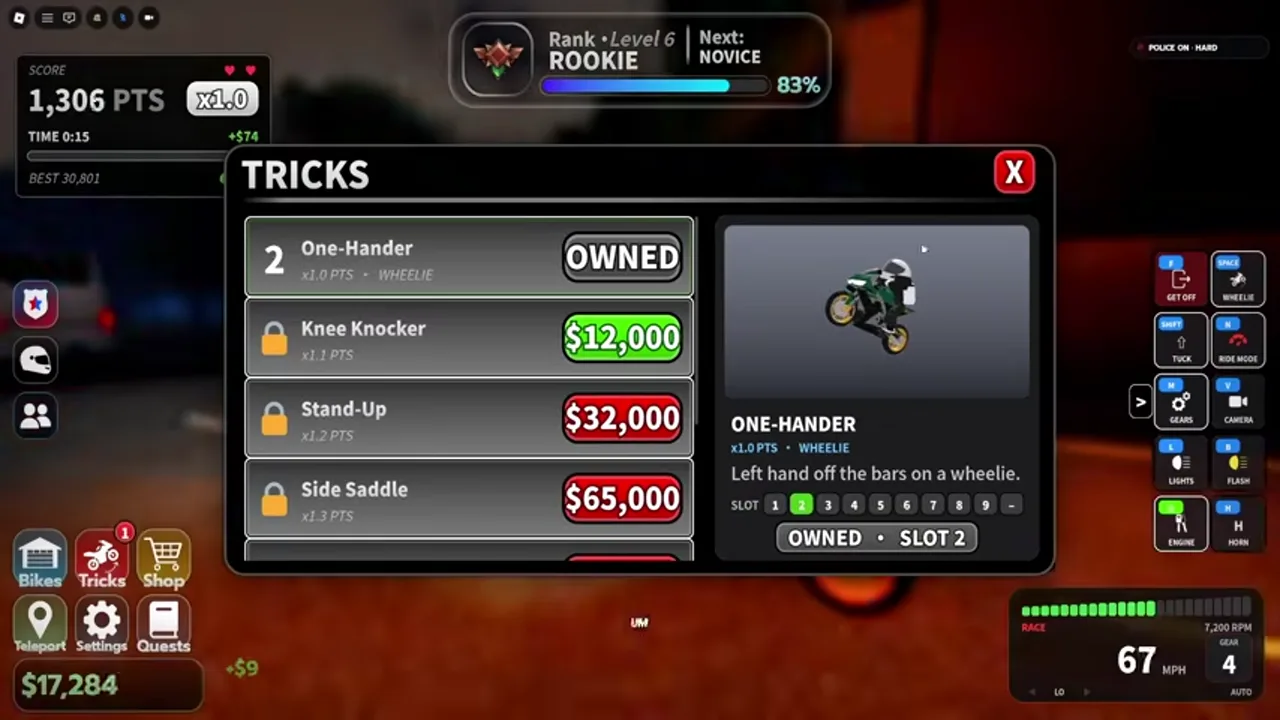
Open Tricks from the lower-left menu. The reviewed panel lists One-Hander as owned, shows other tricks with Cash prices and displays a slot for the selected trick. Select an owned entry, read its description and check the slot assignment.
Use the matching stunt control shown by your riding HUD. If the trick does not trigger, check that it is owned and equipped, that you are using the assigned slot and that you meet any on-screen riding condition. Buying an entry alone may not tell you which input activates it.
The selected One-Hander in the recording is labeled WHEELIE, describes taking the left hand off the bars and is assigned to slot 2. Its displayed score rate is x1.0 PTS. The menu also shows Knee Knocker at $12,000 and x1.1 PTS, Stand-Up at $32,000 and x1.2 PTS, and Side Saddle at $65,000 and x1.3 PTS. Those are recorded menu values. A PTS label should not be treated as a Cash multiplier.
§When the bike starts wobbling#
The developer explicitly warns about death wobbles. The evidence does not establish a guaranteed recovery technique or exact trigger threshold. Start by reducing the complexity of your run: stop combining a long wheelie, rapid steering and dense traffic. Try a slower straight practice run and compare the behavior.
If wobble persists on one vehicle or after a settings change, test the previous setup and note the speed and inputs that reproduce it. This helps distinguish a difficult riding condition from a repeatable testing-build issue.
§FAQ#
Why does my trick not activate?
Check ownership, the assigned slot, your current device control hint and any riding condition shown by the game.
Is there a guaranteed death-wobble fix?
A guaranteed recovery input and exact speed threshold have not been verified. Reduce the complexity of your practice run and compare settings one change at a time.
§Continue in this section#
Hub
Night Rider Guides
Choose a Night Rider guide for your first ride, Cash rewards, bike purchase, tricks or police chase.
GuideArticle
Night Rider Bikes, Dealership & Customization Guide
Read the Night Rider dealership, compare bike stats and approach customization without relying on an unverified tier list.
GuideArticle
Night Rider Police Chases: What to Check First
Understand the police chase HUD in Night Rider and approach community hard-mode advice with clear evidence limits.